In This Article
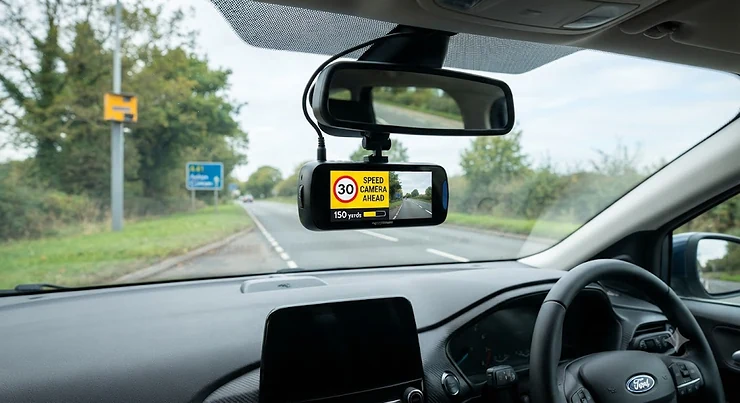
Here’s a confession most drivers won’t make out loud: nobody actually memorises every speed limit change on a road they’ve driven a hundred times. You know the one — where the 40 quietly becomes a 30 just past the church, and there’s a grey box on a pole that’s caught more locals than tourists. A dash cam with speed camera alerts is, at its simplest, a windscreen-mounted camera that combines continuous video recording with GPS-based warnings for fixed, average and mobile enforcement zones. It records everything ahead (and often behind) while quietly tapping you on the shoulder before you reach a known camera site. That’s the definition in one breath — the rest of this guide is about which models actually deliver on it.
This matters more in 2026 than it did a few years back. Mobile phone detection cameras have multiplied along UK motorways, insurers increasingly expect footage as standard evidence rather than a bonus, and “crash for cash” scams still cost the UK hundreds of millions annually according to industry estimates. A dash cam earns its keep protecting you from all of that — but bolt on genuine GPS speed camera alerts and it starts protecting your licence too, not just your no-claims bonus. We’ve researched seven real, currently available dash cams that each combine solid recording with a working speed camera alert system, from budget-friendly starter units to connected 4G flagships. Every product mention below is grounded in verified specifications and aggregated review sentiment — no invented testing, no fabricated star ratings, just honest analysis of what the spec sheets and real owners actually say.
Before diving into the shortlist, it’s worth setting expectations: no gadget replaces good driving. What a decent dash cam with speed camera alerts does do is give you an extra half-second of awareness on unfamiliar roads, back you up if a claim goes sideways, and — for many drivers — quietly encourage the kind of consistent, unhurried driving that keeps insurance premiums down over time.
Quick Comparison Table
| Dash Cam | Front Resolution | GPS Speed Camera Alerts | Price Guide | Best For |
|---|---|---|---|---|
| Garmin Dash Cam 47 | 1440p | Free, subscription-free | £120–£170 range | Hands-free simplicity |
| Mio MiVue C595WD | 1080p | Built-in database | Under £100 | Tight budgets |
| Miofive S1 Ultra | 4K | Yes, plus traffic alerts | £90–£150 range | Best value 4K |
| Viofo Piqo | 1440p | Via optional GPS accessory | £200–£250 range | Swapping between cars |
| Mio MiVue 955WD | 4K front / 2.5K rear | Average speedcam alert | Mid-£200s | Front and rear all-rounder |
| Thinkware U3000 | 4K front / 2K rear | Yes, with radar assist | £350–£450+ range | Premium protection |
| Nextbase iQ 2K | 1440p | Guardian Mode limits | £450–£600+ range | Connected smart features |
Looking at the spread above, there’s a clear pattern: subscription-free GPS alerting (Garmin, Mio, Miofive) tends to sit in the budget-to-mid bracket, while the premium end (Thinkware, Nextbase) trades a simple database lookup for connected, app-driven intelligence that costs more but does considerably more than just beep near a camera. The Viofo Piqo is the odd one out — brilliant footage and a genuinely clever app, but you’re paying extra for a GPS module that some rivals include as standard. Budget-conscious buyers should note that “free” speed camera alerts from Garmin and Mio still rely on periodically updated databases, so the £0 subscription isn’t quite the whole story long-term.
💬 Just one click — help others make better buying decisions too!😊
Top 7 Dash Cams With Speed Camera Alerts: Expert Analysis
Amazon UK stocks dozens of dash cams claiming “GPS” somewhere in the title, but far fewer genuinely alert you to fixed, average and mobile speed cameras out of the box. We’ve focused on seven that do, spanning budget, mid-range and premium price points, plus a couple of lesser-known picks worth a look.
1. Garmin Dash Cam 47 — subscription-free speed and red light alerts
Garmin built its reputation on satnavs, and that heritage shows here: the Dash Cam 47 pairs 1440p/30fps recording with dual-band GPS (GPS and GALILEO) that’s noticeably quicker to lock on than budget rivals. What most buyers overlook about this model is that the speed and red light camera database updates for free via the Garmin Drive app — no recurring fee, unlike some connected competitors on this list. Paired with the GPS, it also offers forward collision, lane departure and “Go” alerts, useful extras for anyone doing regular motorway miles. Based on the spec comparison, this is squarely aimed at drivers who want reliable alerting without fiddling with settings; the 2-inch screen is small and there’s no 4K option, so anyone chasing maximum evidence quality should look further down this list. Reviewers consistently note that voice control (“OK, Garmin”) works well for hands-free saving, and the compact form factor barely intrudes on your view. Parking mode requires a separately purchased cable, which feels like an odd omission for a device otherwise built for convenience.
Pros:
- ✅ Free speed and red light camera alerts, no subscription
- ✅ Dual-band GPS locks faster than most budget rivals
- ✅ Forward collision and lane departure warnings included
Cons:
- ❌ Tops out at 1440p — no 4K option
- ❌ Parking mode needs a separately purchased cable
Priced in the £120–£170 range, the Garmin Dash Cam 47 earns its keep as the sensible, no-nonsense choice for drivers who want proven alert accuracy without ongoing costs.
2. Mio MiVue C595WD — best entry-level for tight budgets
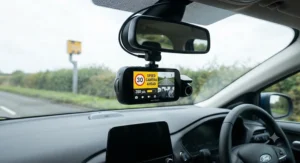
Mio has quietly built one of the deepest speed camera databases in the consumer dash cam market, and the C595WD brings that pedigree to an genuinely affordable price point. A Sony STARVIS sensor captures 1080p Full HD at 60fps — a real-world advantage over the more common 30fps budget cameras, since faster frame rates reduce motion blur on quick-moving traffic. Here’s what to weigh: this is a front-only, single-channel camera, so anyone worried about rear-end shunts (among the most disputed insurance claims) will need to look at a dual-channel model instead. The built-in speed camera database updates over Wi-Fi without a subscription, and Mio’s Average Speedcam Alert function is a genuinely clever touch — it displays distance, target speed and your current average across an average-speed zone, rather than just a generic beep. Reviewers consistently flag the HDR mode as punching above its price bracket for night-time clarity, though the 2-inch display feels dated next to touchscreen rivals.
Pros:
- ✅ Sony STARVIS sensor for genuinely usable low-light footage
- ✅ Average Speedcam Alert shows live distance and target speed
- ✅ No subscription required for camera database updates
Cons:
- ❌ Front-only — no rear coverage without a separate unit
- ❌ 1080p resolution is modest by 2026 standards
At under £100, the C595WD is the honest budget pick: it won’t wow anyone with spec-sheet bragging rights, but the alert accuracy punches well above its price.
3. Miofive S1 Ultra — best value 4K bundle under £150
The S1 Ultra is the model that keeps turning up as a “Best Buy” across independent UK test panels, and it’s easy to see why. Genuine 4K recording at the front (with an optional 4K rear camera) is rare at this price, and the standard GPS module logs both speed and location while triggering audible speed camera alerts and traffic movement warnings. What most buyers overlook about this model is what’s included rather than what’s missing: the bundle typically ships with a rear camera, hardwire kit, SD card and polarising filter — components that cost extra individually on most rivals, which is why it often ends up cheaper overall than a single-camera setup from a premium brand. Reviewers consistently note the colour touchscreen makes setup unusually painless for a budget-tier device, and low-light performance holds up close to models costing considerably more. The trade-off is frame rate: recording is capped at 30fps rather than the 60fps some pricier rivals offer, which matters most if you’re regularly reviewing footage of fast-moving motorway incidents.
Pros:
- ✅ Genuine 4K front recording, rare at this price point
- ✅ Bundle includes rear camera, hardwire kit and SD card
- ✅ GPS-based speed camera alerts plus traffic warnings
Cons:
- ❌ Capped at 30fps, not 60fps
- ❌ Rear camera adjustment limited to up/down movement only
In the £90–£150 range depending on bundle, the S1 Ultra is arguably the best-value 4K dash cam with speed camera alerts currently sold in the UK.
4. Viofo Piqo — best for swapping between cars
The Piqo takes a different approach entirely: it’s built around a slick, social-media-friendly companion app that makes downloading and sharing clips faster than almost anything else on this list. On paper this means less friction after an incident — no fumbling with an SD card, just a quick pull to your phone. Here’s what to weigh, though: the Piqo doesn’t include built-in GPS. To unlock speed camera alerts and ADAS features like lane departure warning, you’ll need to buy an optional GPS accessory separately, which adds both cost and a little extra wiring. Once fitted, reviewers consistently note the alerts work reliably and the wireless multi-camera linking (front, rear, interior) is genuinely easier to install than a traditional cabled rear camera setup. The bundled 32GB card is a small but clever touch — Viofo says it never needs manual formatting, a rare convenience in a category where card corruption is a common complaint. Resolution tops out at 1440p rather than 4K, so anyone prioritising maximum evidence sharpness should weigh that against the Piqo’s flexibility.
Pros:
- ✅ Intuitive app makes downloading and sharing clips fast
- ✅ Wireless multi-camera linking for full coverage
- ✅ Includes an SD card that doesn’t need manual formatting
Cons:
- ❌ GPS speed camera alerts require a separate optional accessory
- ❌ Maxes out at 1440p rather than 4K
At around £200–£250 once the GPS accessory is added, the Piqo suits tech-forward drivers more than it suits pure budget hunters.
5. Mio MiVue 955WD — best front and rear all-rounder
Stepping up the range, the 955WD pairs a genuine 4K front camera with a 2.5K rear unit — a combination that’s still relatively rare, since most dual-channel dash cams compromise the rear to 1080p or lower. Based on the spec comparison, the large 1/1.8-inch sensor and HDR processing are the real story here: they’re what separates usable night footage from the muddy, noise-heavy clips typical of cheaper dual-cam setups. The built-in GPS doesn’t just log speed and location — it drives the same Average Speedcam Alert system found on Mio’s cheaper models, layered with a standard fixed and mobile speed camera database that updates without a subscription. What the spec sheet won’t tell you, but reviewers note, is that full parking-mode protection needs Mio’s SmartBox accessory, an extra cost that’s easy to overlook when comparing headline prices. Voice control and built-in Wi-Fi round out a genuinely well-specified mid-to-premium package.
Pros:
- ✅ Genuine 4K front and 2.5K rear coverage
- ✅ Large 1/1.8″ sensor with HDR for strong night footage
- ✅ Average Speedcam Alert with live distance and speed data
Cons:
- ❌ Full parking mode requires the separate SmartBox accessory
- ❌ Priced above most single-channel rivals on this list
Sitting in the mid-£200s, the 955WD is the pick for drivers who want serious front-and-rear evidence quality without stepping into flagship pricing.
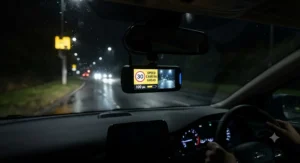
6. Thinkware U3000 — best premium flagship with radar-assisted parking
At the top of the standalone dash cam market, the U3000 combines true 4K front recording with 2K QHD at the rear, built around Sony Starvis 2 sensors that Thinkware markets as Super Night Vision 4.0. Here’s what to weigh: this isn’t just a camera upgrade over the mid-range models above — it adds built-in front and rear radar to sharpen motion detection while parked, which meaningfully reduces both missed impacts and false-trigger recordings compared with G-sensor-only systems. The Thinkware Connected App layers geofencing, impact notifications and a vehicle locator on top of standard GPS-based speed camera alerts, positioning this as closer to a connected security system than a simple recorder. Reviewers consistently flag the night-time clarity as genuinely class-leading, a direct result of the sensor pairing rather than marketing spin. Given the feature density, professional installation is the sensible route for most buyers, which adds to the overall cost but avoids the wiring headaches dual-radar, dual-camera systems can create for DIY fitters.
Pros:
- ✅ True 4K front and 2K rear with Sony Starvis 2 sensors
- ✅ Built-in radar sharpens parking-mode motion detection
- ✅ Connected app adds geofencing and vehicle locator
Cons:
- ❌ Professional installation is strongly recommended, adding cost
- ❌ Premium price reflects the extensive feature set
In the £350–£450+ range before fitting, the U3000 is the sensible splurge for drivers who park on the street or want the most complete protection package available.
7. Nextbase iQ 2K — best smart, connected dash cam
The Nextbase iQ takes the category somewhere genuinely different: a 4G-connected, cloud-based smart dash cam rather than a conventional SD-card recorder. Guardian Mode is the headline feature relevant here — set custom speed and location limits and the iQ sends an instant app alert if they’re broken, which functions differently from a traditional fixed-camera database but delivers real practical value, particularly for parents monitoring young or new drivers. On top of that, Roadwatch AI uses the onboard computer-vision chipset to estimate the speed of surrounding vehicles to within roughly 2.5mph, adding useful context to any incident footage. What most buyers overlook about this model is the ongoing cost: the full feature set, including live view and Emergency SOS, requires a Protect or Protect Plus subscription on top of the hardware price. Reviewers consistently praise the app’s polish and the GPS accuracy, while noting that the semi-permanent hardwired installation makes it impractical to move between vehicles — this is very much a “fit once, keep” camera rather than a portable unit.
Pros:
- ✅ Guardian Mode sends instant alerts for custom speed/location limits
- ✅ Roadwatch AI estimates surrounding vehicle speeds
- ✅ Emergency SOS shares location and medical data automatically
Cons:
- ❌ Full smart features require an ongoing subscription
- ❌ Semi-permanent install makes it hard to move between cars
At £450–£600+ before any subscription, the iQ 2K is the connected flagship for buyers who want a dash cam that actively watches over the car, not just records it.
Practical Usage Guide: Setting Up Your Dash Cam With Speed Camera Alerts
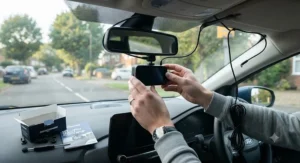
Getting genuine value from GPS speed camera alerts starts before you’ve even left the driveway. First, mount the camera centrally behind the rear-view mirror, within the area cleared by your wipers — anywhere else and you risk both poor footage and an obstructed view, which is itself against the Highway Code’s requirement not to block your vision. Second, update the camera database immediately after unboxing; models like the Mio and Miofive ranges ship with databases that may already be a few months stale, and speed camera locations do change as new average-speed zones go live around roadworks. Third, resist the temptation to skip the app pairing step — even “screen-free” dash cams like the Garmin rely on a paired smartphone app for the fastest database refreshes.
A simple 30-day maintenance habit avoids most common first-month complaints. Reformat the SD card every two to three weeks directly through the camera’s menu rather than a computer, since continuous-loop recording writes and overwrites files far more aggressively than typical photo storage, which is exactly why manufacturers recommend high-endurance, automotive-grade cards rather than standard consumer ones. Check the polarising filter (where fitted) hasn’t rotated out of alignment, since a misjudged glare filter can actually worsen footage rather than improve it. Finally, if you’ve opted for a hardwired parking mode, get the voltage cut-off threshold checked during a routine service — this single setting is what stands between “protected car” and “flat battery on a cold January morning.”
Real-World Scenarios: Matching a Dash Cam GPS Tracker to Your Driving
Not every driver needs the same combination of camera and dash cam gps tracker functionality, so it helps to think in terms of who you actually are behind the wheel. Take a commuting graduate doing 40 miles a day on unfamiliar A-roads to a new job: budget is tight, but the routine involves passing through several average-speed zones around ongoing roadworks. The Mio MiVue C595WD or Garmin Dash Cam 47 make sense here — subscription-free alerting keeps ongoing costs at zero, and neither demands the fitting complexity of a radar-equipped flagship.
Contrast that with a family running two cars and regularly lending one to a newly qualified teenage driver. Here, the Nextbase iQ’s Guardian Mode earns its premium price: instant app alerts if the car exceeds a set speed or leaves a defined area offer genuine peace of mind that a passive camera database simply can’t replicate, even if it means paying a monthly subscription. Finally, picture a higher-mileage rep or delivery driver who parks in varied, sometimes risky locations overnight. The Thinkware U3000’s radar-assisted parking mode and geofencing reduce false alarms while genuinely catching real incidents — worth the extra outlay when the car spends more hours parked and unattended than actually being driven.
Problem → Solution: Fixing Common Speed Trap Warning Issues
Even a well-reviewed dash cam speed trap warning system throws up a handful of predictable problems, and most have straightforward fixes. Problem: alerts fire late or not at all. This is usually a stale database rather than faulty hardware — update it monthly via the manufacturer’s app, particularly after any period of reduced use. Problem: false alerts for cameras that no longer exist. Fixed camera databases occasionally lag behind decommissioned sites; most apps, including Mio’s and Garmin’s, let you flag and remove individual entries manually. Problem: GPS takes ages to lock in built-up areas or multi-storey car parks. This is a physics limitation, not a design flaw — dual-band models like the Garmin Dash Cam 47 lock noticeably faster than single-band rivals, so if this is a recurring frustration, it’s worth prioritising when choosing a camera.
Problem: no alerts for mobile enforcement vans. Genuine mobile camera warning coverage relies on crowdsourced or frequently-updated data, since vans move daily; models with active app connectivity (Nextbase iQ, Thinkware Connected) tend to refresh this data more often than SD-card-only systems that update on a fixed schedule. Problem: audible alerts are too quiet or too intrusive. Nearly every model on this list allows independent volume adjustment for camera alerts versus general notifications in the settings menu — a five-minute fix that’s easy to overlook during initial setup.
How to Choose a Dash Cam With Speed Camera Alerts
- Confirm the alert type matches your needs. Some cameras (Garmin, Mio) include a built-in fixed and average camera database at no extra cost; others (Nextbase iQ, Viofo Piqo) rely on connected apps or optional accessories — decide whether ongoing subscriptions are acceptable to you before comparing hardware.
- Check GPS chip quality, not just presence. Dual-band GPS/GALILEO models lock faster and stay more accurate in urban canyons and tunnels than older single-band units.
- Prioritise sensor quality over headline resolution. A genuine 1440p camera with a good sensor often out-resolves a “4K” unit using an upscaled smaller sensor, particularly at night.
- Decide on front-only versus dual-channel early. Rear-end collisions are common enough that most UK drivers benefit from at least a basic rear camera, even a lower-resolution one.
- Factor in installation realism. Radar-equipped and 4G-connected flagships genuinely benefit from professional hardwiring; if you’re not confident doing this yourself, budget for fitting alongside the camera price.
- Check database coverage for your regular routes. Not every provider covers every UK region equally, so it’s worth checking recent user feedback for your specific area before committing.
- Weigh subscription costs over three years, not one. A cheaper camera with a £5/month subscription can cost more over its lifetime than a pricier subscription-free alternative.
Dash Cams That Record Location vs Standalone GPS Trackers
It’s easy to conflate a dash cam that records location with a dedicated vehicle GPS tracker, but they solve different problems. A dash cam’s GPS chip exists primarily to stamp speed, location and heading onto video footage — useful for insurance evidence and, on the models covered here, to trigger camera alerts as you approach known enforcement zones. A standalone GPS tracker, by contrast, is built for continuous fleet-style monitoring or anti-theft recovery, typically reporting location constantly to a linked app or third party, independent of whether the vehicle is even being driven.
For the vast majority of private UK drivers, a dash cam with integrated GPS covers everything genuinely needed: accurate speed and location data embedded in footage, plus speed camera alerts, without the recurring data-plan costs that dedicated trackers often carry. Fleet operators and parents of new drivers are the exception — models like the Nextbase iQ blur the line by adding always-connected tracking features closer to a standalone tracker’s capability, which is exactly why it commands a premium subscription over the passive-alert models further down this list.
Understanding the Fixed Speed Camera Database
Every GPS-based alert system, regardless of brand, depends on a fixed speed camera database — essentially a regularly updated list of known camera coordinates covering Gatso, Truvelo and average-speed (SPECS-style) sites. These systems use publicly available location data rather than intercepting any police equipment, which is precisely why GPS-only speed camera detectors remain legal in the UK, unlike laser jammers or radar-jamming devices. Coverage quality varies meaningfully between brands: Mio and Garmin have maintained their databases for well over a decade and tend to cover both fixed and average-speed sites comprehensively, while newer entrants sometimes lag on rural or recently-installed cameras.
Update frequency matters more than most buyers initially realise. A database that’s six months stale won’t reflect newly installed average-speed cameras around long-term roadworks — precisely the situations where an unexpected drop from 70mph to 50mph catches drivers out. National Highways explains that its average speed enforcement cameras around roadworks calculate a vehicle’s average speed between an entry and exit point using automatic number plate recognition, rather than a single-point snapshot — which is exactly the enforcement style that catches drivers who slow only briefly as they spot a camera.
Mobile Camera Warning: How Dash Cams Detect Moving Enforcement
Fixed cameras are, by definition, predictable — mobile enforcement is the trickier category for any mobile camera warning system to cover well. Police speed enforcement vans and handheld devices move daily, so no static database can reliably predict their exact location on any given day. Instead, the better-performing systems on this list — particularly connected models like the Nextbase iQ and Thinkware’s app-linked cameras — lean on more frequently refreshed data pulled from wider crowdsourced networks, updated far more often than a monthly SD-card sync.
Reviewers consistently note that mobile camera warnings work best treated as a probability nudge rather than a guarantee: an alert means enforcement has been reported in that general area recently, not that a van is parked at that exact spot right now. That distinction matters for expectation-setting — a driver relying on mobile alerts as a substitute for actually knowing the speed limit is setting themselves up for disappointment, and potentially a fine.
Safety Camera Notification Accuracy: What Affects Reliability
Several factors influence how consistently a safety camera notification actually fires when it should. GPS signal quality is the biggest variable — dense urban streets, tunnels and multi-storey structures all degrade accuracy temporarily, which is where dual-band chips (as used in the Garmin Dash Cam 47) show a genuine, measurable advantage over cheaper single-band alternatives. Database freshness is the second major factor, covered above, and it’s worth checking each manufacturer’s update cadence rather than assuming “GPS-enabled” automatically means “current.”
Speed threshold settings also affect perceived reliability. Some systems alert purely on proximity to a known camera location regardless of your speed, while others (like Mio’s Average Speedcam Alert) factor in your actual speed relative to the posted limit before triggering a notification — the latter approach produces fewer nuisance alerts for drivers already well within the limit. Finally, mounting position genuinely matters: a dash cam tucked too low or angled awkwardly can occasionally interfere with GPS antenna reception on lower-cost units, so following the manufacturer’s recommended windscreen placement isn’t just about video quality.
Common Mistakes When Buying a Dash Cam With Speed Camera Alerts
The single most common mistake is assuming “GPS” on the box automatically means speed camera alerts are included — as the Viofo Piqo demonstrates, GPS and camera alerting are sometimes separate purchases entirely. A close second is underestimating storage needs: continuous 4K dual-channel recording chews through microSD capacity fast, and using a standard consumer card rather than a high-endurance one is a leading cause of corrupted footage exactly when it’s needed most. Buyers also frequently overlook installation costs when comparing headline prices — a £350 camera that genuinely needs £100–£150 of professional hardwiring isn’t really a £350 purchase.
Another frequent misstep is ignoring subscription terms until after purchase. Connected smart cameras like the Nextbase iQ deliver real value, but only with an active Protect or Protect Plus plan — buying on hardware price alone and discovering the ongoing cost later leads to a lot of buyer’s remorse in online reviews. Finally, some drivers assume any dash cam automatically qualifies for an insurance discount; in practice, insurers typically require the footage to be unedited with original timestamps and, in some cases, a specific approved model list — always check with your own insurer before assuming a discount applies.
Long-Term Cost & Maintenance
Total cost of ownership varies more between these seven cameras than the headline prices suggest. Subscription-free models — Garmin, Mio and Miofive — cost essentially nothing beyond the initial purchase and occasional replacement SD card, typically £15–£25 for a suitable high-endurance card every couple of years. Connected models flip that equation: the Nextbase iQ’s Protect Plus plan, layered onto an already premium hardware cost, means genuine three-year ownership costs can comfortably exceed double the sticker price once subscription fees are included.
Professional installation is the other overlooked cost. Radar-equipped and multi-camera systems like the Thinkware U3000 genuinely benefit from expert hardwiring, typically £50–£150 depending on vehicle complexity, but that upfront spend usually pays for itself in a tidier install and properly configured parking-mode voltage cut-off — protecting the car battery rather than draining it flat. Weighed against the average £340 million annual cost of UK “crash for cash” fraud that dash cam footage helps counter, even the priciest camera on this list is a modest investment against a real financial risk.
Safety, Regulations & Compliance Guide
UK law draws a clear line between passive GPS-based warning systems and active interference devices. GPS speed camera detectors — including the alert functions built into every dash cam covered in this guide — remain fully legal in the UK, because they rely on publicly available location data rather than intercepting or disrupting any enforcement equipment. Laser and radar jammers sit in an entirely different, illegal category, since they’re designed to actively interfere with detection hardware rather than simply warn a driver. It’s worth noting this legal position doesn’t automatically travel with you abroad — several European countries, including France, prohibit GPS-based speed camera warning devices outright, so it’s sensible to check local rules before a driving holiday.
On the enforcement side, GOV.UK confirms that the minimum penalty for speeding in the UK is a £100 fine plus three penalty points, rising considerably for more serious offences, with drivers risking disqualification once they accumulate 12 or more points within three years. For anyone wanting a deeper dive into how bands and fines actually escalate, RAC’s speeding fines guide breaks down the minor, serious and most serious offence categories in plain terms.
Features That Actually Matter (And Those That Don’t)
Cutting through the marketing noise: genuine sensor quality, dual-band GPS and database update frequency matter enormously for real-world alert reliability. A wide field of view (140° or above) matters too, since narrower lenses genuinely miss relevant footage at junctions. What matters far less than the marketing suggests is raw resolution alone — as Which?’s dash cam testing notes, cheaper “4K” cameras using upscaled smaller sensors often produce less usable detail than a well-specified genuine 1440p unit, particularly after dark.
Touchscreens are a genuine convenience feature but not a functional necessity — several of the most reliable alert systems here (Garmin, base-spec Mio) use small non-touch displays without any real loss of core performance. Voice control is similarly a nice-to-have rather than essential, though it’s a genuine safety plus for reducing distraction while driving. Ultimately, the features that actually move the needle for a dash cam with speed camera alerts are the ones covered in the “How to Choose” section above — everything else is largely personal preference.
FAQ
❓ Are dash cam speed camera alerts legal in the UK?
❓ Do dash cam speed camera alerts work abroad?
❓ Will a dash cam with speed camera alerts lower my car insurance?
❓ How often should I update my dash cam's speed camera database?
❓ Can a dash cam replace a dedicated GPS tracker for teen drivers?
Conclusion
A genuinely good dash cam with speed camera alerts isn’t about chasing the highest resolution number on the box — it’s about matching real GPS accuracy, honest database coverage and sensible installation to how you actually drive. Budget-conscious commuters get excellent value from subscription-free options like the Garmin Dash Cam 47 or Mio MiVue C595WD, while families juggling a new driver or higher-risk overnight parking will likely find the connected intelligence of the Nextbase iQ or the radar-assisted protection of the Thinkware U3000 worth the extra spend. The Miofive S1 Ultra remains the standout for anyone wanting genuine 4K without a premium price tag, and the Viofo Piqo suits drivers who value a slick app experience over built-in GPS as standard.
Whichever you choose, remember that the alert is a nudge, not a get-out-of-jail card — the safest, cheapest way to avoid a speeding fine is still simply driving within the limit. A dash cam just makes sure you’ve got clear, honest evidence on your side for everything else the road throws at you.
✨ Don’t Miss These Exclusive Deals!
🔍 Take your search for the right dash cam with speed camera alerts to the next level with these carefully researched picks. Click through to check current pricing and availability on Amazon UK before you decide. The right camera today could save you real money — and real hassle — down the road!
Recommended for You
- Dash Cam With GPS: 7 Best Options Tested for UK Drivers 2026
- Best Dash Cam for the Money UK 2026: 7 Picks That Punch Above Their Price
- Best Budget Dash Cams UK 2026: 7 Affordable Picks That Actually Deliver
Disclaimer: This article contains affiliate links. As an Amazon Associate, I earn from qualifying purchases. If you purchase products through these links, we may earn a small commission at no additional cost to you.
✨ Found this helpful? Share it with your friends! 💬🤗
